JavaScript Call Stack & Event Loop: How They Work
Doğukan BatalUpdated
On this page
Every JavaScript developer runs into the call stack and the event loop sooner or later, usually while debugging something async that runs in the wrong order. This post walks through both with two small examples.
The call stack
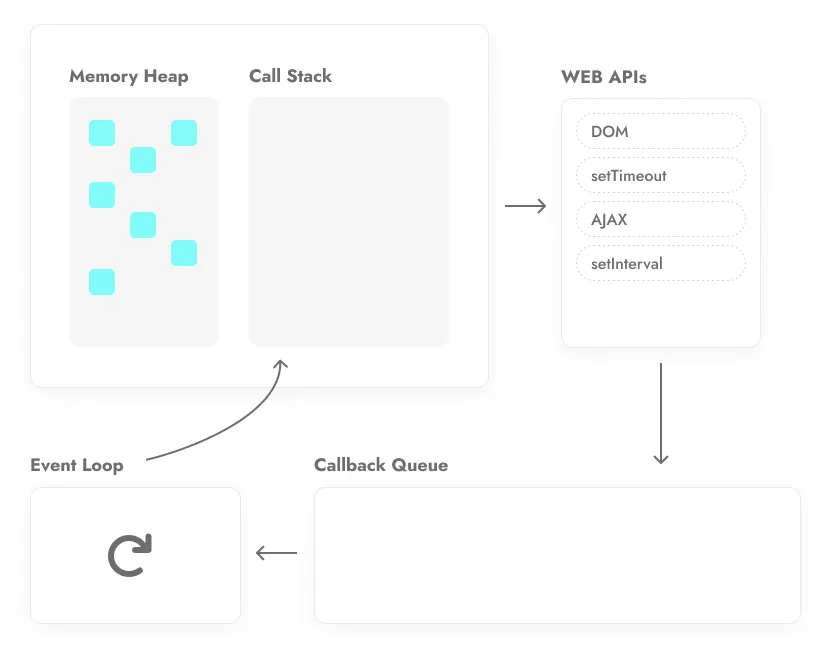
JavaScript runs on a single thread, so it does one thing at a time with one call stack. Engines like Chrome’s V8 use this stack to track what is running. It works last in, first out (LIFO): the last function added is the first one to finish.
A few other parts work around the stack:
- Memory heap. Where the variables, objects and functions we create are stored.
- Web APIs. JavaScript is single-threaded, but the browser is not. When you start something async, like an API request or a timer, the browser handles it outside the stack and the stack moves on. Say you want to log “hello” after one second with
setTimeout.setTimeout()goes onto the stack, hands its callback to the Web APIs with the one-second delay, and leaves the stack. Nothing is blocked. After one second the callback moves to the callback queue, and once the stack is empty the event loop pushes it onto the stack. - Callback queue. When an async task in the Web APIs finishes, its callback waits here.
- Event loop. As soon as the call stack is empty, it takes the first callback from the queue and puts it on the stack.
In the code below there are three functions. foo logs “foo”, bar logs “bar”, and hello calls foo and bar and then logs “hello”. The last line calls hello().
function foo(){
  console.log("foo");
}
function bar(){
  console.log("bar");
}
function hello(){
  foo();
  bar();
  console.log ("hello");
}
hello();
The code runs from top to bottom:
hello()goes onto the stack. It callsfoo(), sofoois added on top.foocallsconsole.log, which is added on top of that. Because the stack is LIFO,console.logruns and leaves first, thenfoois done and leaves too.hellois still on the stack because it has not finished. Nowbaris added, logs “bar” the same way, and leaves.- Finally
hellologs “hello”. Thatconsole.logis added, runs and leaves, and with nothing left to do,helloleaves the stack as well.
Async
Here is the same idea with setTimeout:
console.log("hello");
function world(){
     console.log("world")
}
setTimeout(function cbFunction(){
     console.log("Callback Function")
}, 1000);
world();
- The first line goes onto the stack, logs “hello” and leaves.
worldis a function that logs “world”. It is called aftersetTimeout.setTimeoutgoes onto the stack, passescbFunctionto the Web APIs with its 1000 ms delay, and leaves.world()and itsconsole.loggo onto the stack one after the other, run and leave. Meanwhile the 1000 ms pass andcbFunctionmoves to the callback queue.- The event loop sees the stack is empty and pushes
cbFunctiononto it. It logs “Callback Function” and leaves, and the stack is empty again.